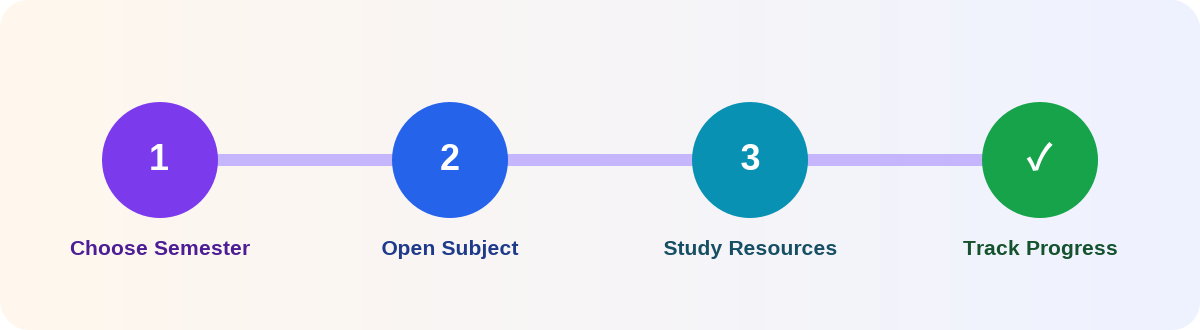
GyanPath User Guide
This guide explains GyanPath in simple English.
1. Start Here
- Open Home and sign in or create an account.
- Open Resources.
- Choose a semester, then choose a subject.
- You must sign in to save bookmarks and learning progress.
2. Study Resources
- Subject cards show available study material, papers, question banks and lectures.
- Use the page sidebar to move between semesters and subjects.
- If a subject has no published file, its resource action may not appear.
3. Question Papers
- Open the question-paper collection from a subject card.
- Search by subject, session or file name.
- Select a paper to open the PDF reader.
- Switch between English and Hindi when both files are available.
4. Question Bank
- Search by topic, tag, year or question text.
- Filter by marks and difficulty.
- Choose Short, Exam or Detailed answers when available.
- Use Bookmark, Revision and Completed to organise your study.
5. Video Lectures
- Open Video Lectures from a subject card or the lecture page.
- Search by title, unit or teacher.
- Use the language filter when needed.
- Some publishers do not allow embedded playback; open YouTube directly in that case.
6. Profile and Progress
- Open Profile after signing in to review account information.
- Your bookmarks, revision items and completed questions are saved to your account.
- If your session ends, sign in again before saving a change.
7. Appearance and Navigation
- Choose Light, Dark or Sepia from the theme controls.
- On a phone, open the menu to see navigation links.
- Your theme and guide language are saved in this browser.
8. Common Problems
- Empty page: Refresh once and check that the subject has published content.
- Progress not saved: Make sure you are signed in.
- PDF unavailable: Try another language or session.
- Access denied: Sign in with an account allowed to open that page.
9. Feedback
Open About to read about the project and send feedback. Do not include passwords or private information.
10. Role-specific Guides
These protected guides appear only when your signed-in role is allowed to use them.
- Editor Guide — content management, publishing checks and GitHub sync instructions.
- Admin Guide — users, security, database and deployment instructions.
11. Disclaimer
GyanPath is an independent study helper, not an official IGNOU website. Always confirm deadlines and official rules through IGNOU.
GyanPath उपयोगकर्ता मार्गदर्शिका
इस guide में GyanPath का उपयोग आसान हिंदी में समझाया गया है। जरूरी technical words English में रखे गए हैं।
1. शुरुआत कैसे करें
- Home खोलें और sign in करें या नया account बनाएँ।
- Resources page खोलें।
- पहले semester और फिर subject चुनें।
- Bookmarks और learning progress save करने के लिए sign in जरूरी है।
2. Study Resources
- Subject card पर उपलब्ध study material, papers, question bank और lectures दिखाई देते हैं।
- Semester या subject बदलने के लिए page sidebar इस्तेमाल करें।
- जिस subject में published file नहीं है, उसका resource action दिखाई नहीं देगा।
3. Question Papers
- Subject card से question-paper collection खोलें।
- Subject, session या file name से search करें।
- Paper चुनकर PDF reader में खोलें।
- दोनों files उपलब्ध हों तो English और Hindi के बीच switch करें।
4. Question Bank
- Topic, tag, year या question text से search करें।
- Marks और difficulty के filters लगाएँ।
- उपलब्ध होने पर Short, Exam या Detailed answer mode चुनें।
- पढ़ाई व्यवस्थित करने के लिए Bookmark, Revision और Completed actions इस्तेमाल करें।
5. Video Lectures
- Subject card या lecture page से Video Lectures खोलें।
- Title, unit या teacher से search करें।
- जरूरत होने पर language filter लगाएँ।
- Embedded video न चले तो उसका YouTube source सीधे खोलें।
6. Profile और Progress
- Sign in करने के बाद Profile page पर account information देखें।
- Bookmarks, revision items और completed questions आपके account में save होते हैं।
- Session खत्म हो जाए तो बदलाव save करने से पहले दोबारा sign in करें।
7. Appearance और Navigation
- Theme controls से Light, Dark या Sepia चुनें।
- Mobile पर navigation links देखने के लिए menu खोलें।
- Theme और guide language इसी browser में save रहती है।
8. सामान्य समस्याएँ
- Page खाली है: एक बार refresh करें और देखें कि subject में published content है या नहीं।
- Progress save नहीं हुई: confirm करें कि आप sign in हैं।
- PDF उपलब्ध नहीं है: दूसरी language या session try करें।
- Access denied: उस page की permission वाले account से sign in करें।
9. Feedback
Project की जानकारी और feedback के लिए About page खोलें। Password या private information feedback में न लिखें।
10. Role के अनुसार Guides
ये protected guides केवल उसी signed-in role को दिखाई देंगी जिसे उनकी permission है।
- Editor Guide — content management, publishing checks और GitHub sync की जानकारी।
- Admin Guide — users, security, database और deployment की जानकारी।
11. जरूरी सूचना
GyanPath एक independent study helper है, official IGNOU website नहीं। Deadlines और official rules हमेशा IGNOU से confirm करें।